Once someone has decided they need a website, the next question is almost always the same: "Should it be on WordPress, or should you build it from scratch?" It gets asked as if one answer is obviously smarter than the other. It isn't. They're two different tools for two different situations, and picking the wrong one costs you either money you didn't need to spend or flexibility you'll wish you had.
Here's how I actually think about it when a client asks.
What each one really means
Quick definitions, because the terms get used loosely:
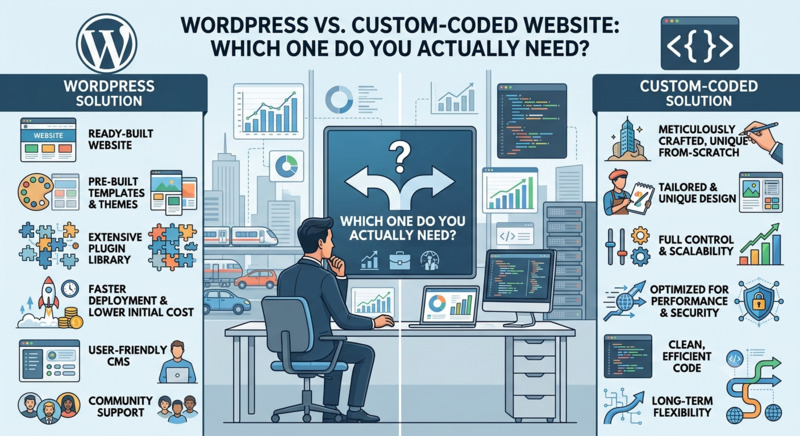
- WordPress is a ready-made content management system. You get an admin panel, a theme for the design, and plugins for extra features. A big share of the web runs on it. You're assembling and customizing existing pieces rather than building them.
- Custom-coded means the site is built specifically for your project — the front end, and usually a framework like Laravel behind it. Nothing is there unless someone put it there on purpose. That's the cost and the point.
"Custom" doesn't have to mean "reinventing everything." A good custom build still uses proven frameworks and libraries. What's custom is that the structure fits your content and workflow instead of the other way around.
When WordPress is the right call
For a lot of businesses, WordPress is genuinely the sensible choice — not a compromise:
- You publish content regularly. Blog posts, news, case studies, events. WordPress was built for exactly this, and non-technical staff can update it without calling a developer every time.
- Your site is fairly standard. Home, about, services, portfolio, blog, contact. This is a solved problem — paying for it to be hand-built from zero rarely pays off.
- Budget and timeline are tight. Starting from a solid base is faster and cheaper than starting from an empty folder.
- You want to make small edits yourself. Swapping text, images, and prices through an admin panel is a real day-to-day advantage.
The trade-off: you inherit WordPress's ecosystem. Plugins need updating, poorly built ones slow the site down or open security holes, and every plugin is another thing that can break on an update. It's manageable, but it's ongoing work — it isn't "set and forget."
When custom code earns its cost
Custom development is worth it when your project stops looking like a website and starts looking like software:
- Your core feature doesn't come in a plugin. A booking flow with your specific rules, a pricing calculator, a customer dashboard, an internal tool, an integration with software you already use. Forcing this into WordPress with five plugins glued together usually ends up more fragile and more expensive than building it properly.
- Performance is critical. When every bit of page speed affects revenue, a lean custom front end with no plugin overhead gives you control that a plugin-heavy WordPress site can't match.
- You're planning to scale or raise funding. If this is the foundation of the business rather than a marketing page, you want a clean, well-structured codebase your future team can build on.
- Security and data handling really matter. A smaller, purpose-built codebase has less surface area to attack than a popular platform running third-party plugins.
- The design or interaction is genuinely unusual. If the whole point is an experience nobody else has, a theme will fight you the entire way.
The trade-off: it costs more upfront, takes longer, and you're more dependent on a developer for structural changes — so the person or team who builds it needs to hand over clean code and documentation, not a black box.
A quick side-by-side
| WordPress | Custom-Coded | |
|---|---|---|
| Upfront cost | Lower | Higher |
| Time to launch | Faster | Longer |
| Editing content yourself | Easy, built in | Needs a CMS to be added deliberately |
| Custom features / business logic | Limited by plugins | Whatever you need |
| Performance ceiling | Good, with effort | Higher |
| Ongoing maintenance | Regular plugin / core updates | Less frequent, more technical |
| Best fit | Content sites, standard business sites | Web apps, unusual needs, scale plans |
The middle ground people forget
It's not always all-or-nothing. A few hybrids work well:
- WordPress as a headless CMS — editors use the familiar WordPress admin, but a custom front end renders the site. You keep easy content editing and gain performance and design freedom.
- Custom site with a lightweight CMS — a custom build where just the parts you actually update (blog, team, testimonials) are editable, and nothing else.
- Start on WordPress, rebuild the part that outgrows it — launch quickly, and when one feature becomes the heart of the business, build that piece properly later.
How to actually decide
Ask yourself three things:
- What will I need to change myself, and how often? Frequent content changes push toward WordPress or a CMS-backed build.
- Is there a feature at the centre of this that isn't just "a website"? If yes, lean custom.
- Where is this project in a year — roughly the same, or much bigger? Bigger plans justify investing in the foundation now.
If it's a straightforward site you'll update often and you need it live soon, WordPress is very likely the right answer and I'll tell you that. If your idea depends on something custom, or it's the backbone of the business, that's when hand-built code stops being a luxury and starts being the cheaper option over time.
Not sure which side your project falls on? Describe what you're building and I'll give you a straight recommendation — even if that recommendation is "you don't need me to custom-build this."